Student Financial Responsibility Agreement
How to Complete the SFRA
1. On the WVC website, click on ctcLink at the very top of the page. 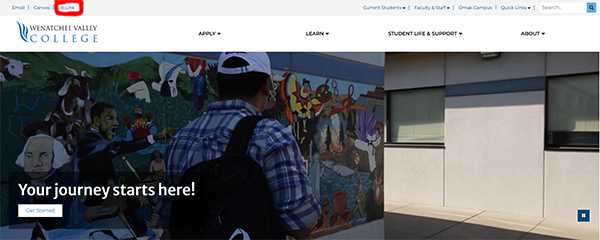
2. Enter your WVC Student ID (which is your ctcLink ID) and your password. You will get a verification via email or through your phone. 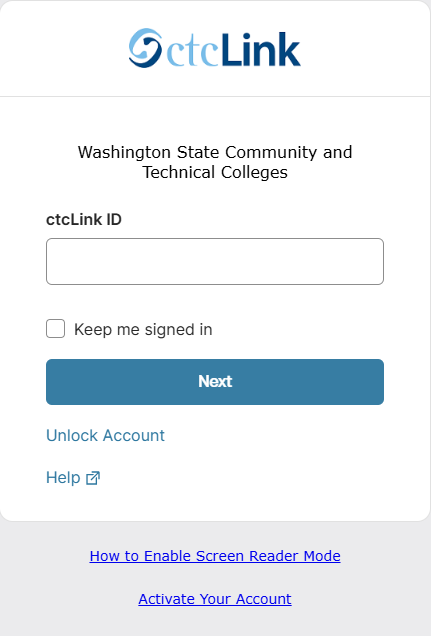
3. Locate the My Information tab on the left hand-side menu, click the drop-down button, and select the Holds tab. 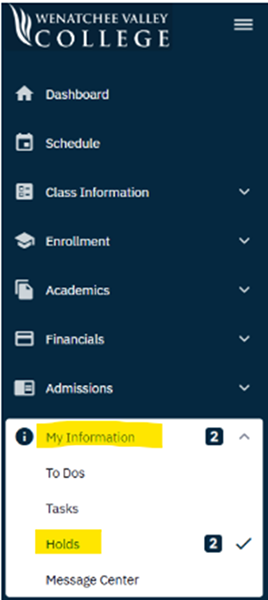
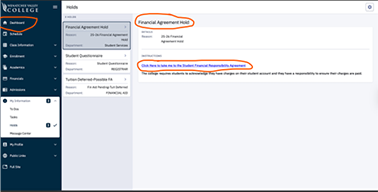
4. Click on the Financial Agreement Hold and open the link. Read the agreement and click the Accept button.
5. The Student Financial Responsibility Agreement (SFRA) is for a year (starting in summer, through fall, winter, and spring quarters). Please
be aware that even if you complete the SFRA, BUT you owe more than $200.00 in tuition and fees to the college, you will not be able to register until the tuition balance has been
addressed. You can Pay Online or contact the Cashiers Office. If you have pending financial aid or scholarship, please contact the Financial Aid
Office.
Contact
| Cashiers Office | Financial Aid | |
| Phone: (509) 682-6500 | Wenatchee: (509) 682-6810 | |
| Email: cashier@wvc.edu | Omak: (509) 422-7800 | |
| Email: financialaid@wvc.edu |